Three plants, several warehouses, one supplier network: what works with phone calls and spreadsheets at a single site becomes harder to manage across multiple locations. The same carrier faces different arrival rules; one warehouse requires an advance notice while another does not. Head office sees expected transport volume but cannot always tell which trucks are actually waiting at the gate.
This is the challenge of multi-site logistics management. It means coordinating freight flows and operational processes across warehouses, plants and distribution centres using shared information and clear responsibilities. It does not mean forcing every dock to operate in exactly the same way. It means making data comparable while letting local teams respond to what is happening on site.
This guide covers central standards, local exceptions, master data, supplier onboarding, yard and inbound processes, inter-site transfers, KPIs and a practical rollout. It also distinguishes the operational coordination of deliveries from inventory management in ERP and warehouse management systems (WMS).
What is multi-site logistics?
Multi-site logistics is the management of related logistics activities beyond the boundaries of one facility. A network might include production plants, central warehouses, regional distribution centres and outsourced locations. Two areas are closely related but should not be confused.
- Stock and material flows: Inter-plant transfers, stock availability, replenishment, inventory accounting and movements recorded in ERP or WMS.
- Operations at each site: Advance notices, time slots, truck arrivals, goods receiving and dispatch, yard coordination, supplier communications and process reporting.
A company may have accurate inventory records but inconsistent gate processes. Another may plan docks effectively while goods moving between two locations are not clearly shown as stock in transit. Successful multi-site logistics addresses both areas and defines which system owns which information.
1. Why multiple logistics locations become difficult to manage
Operational differences usually grow over time. An organisation acquires a warehouse, opens an additional plant or inherits a regional workflow. Local workarounds become routine, making it difficult to assess performance across the network.
Five recurring problems
- Inconsistent delivery rules: Plant A requires booked arrivals, while Plant B accepts trucks without appointments. Suppliers have to learn a different process at each location.
- Fragmented communication: Some teams use a calendar; others work in spreadsheets or shared inboxes. Delays and rescheduling can be lost between shifts.
- No reliable view of exceptions: The network can see expected quantities but lacks consistent information about truck queues, missing documents or blocked docks.
- Unreliable comparisons: Waiting time may begin at the gate at one location and only at check-in at another. A direct KPI comparison is then misleading.
- Repeated partner onboarding: A carrier serving several plants must register, receive instructions and learn booking steps separately at each site.
The issue is not just the absence of a central calendar. Companies need common event definitions, shared identifiers and clear ownership of exceptions. At a single facility, the effects often appear as loading dock congestion.
2. Set the operating model: Central standards, local decisions
Central management requires visibility and a consistent framework. Site managers need the authority to handle urgent material, unavailable docks, late arrivals and local safety conditions. Neither extreme works well: different rules everywhere prevent comparison; rigidly identical rules ignore physical differences.
What should be standardised across sites?
- Definitions for shipment, advance notice, booking, check-in, unloading start and process completion.
- Required data about suppliers, carriers, orders, handling units and destination locations.
- Basic rules for bookings, cancellations, late arrivals, documentation and escalations.
- Data protection, permissions, retention and consistent KPI definitions.
- A repeatable process for adding new delivery partners and new facilities.
What should remain locally configurable?
- Opening hours, shift patterns, docks and unloading teams.
- Handling times for standard pallets, containers, special cargo and temperature-controlled loads.
- Gate routing, waiting zones, driver instructions and safety procedures.
- Priority decisions during disruption within an agreed framework.
- Local exceptions, provided the resulting events remain understandable centrally.
A practical governance model has one central process owner and an accountable lead at each site. Headquarters can require a unique shipment reference; the local team decides how many people it needs for a particular unloading task. The aim is one understanding of what was planned, what happened and what must happen next.

3. Create a shared data foundation before building dashboards
Network-level visibility requires reliable references. Duplicated suppliers, ambiguous delivery addresses or the same transport recorded under different numbers produce confusion even in modern software.
Three connected data layers
- Master data: Sites, warehouses, docks, supplier records, carriers, products and handling units.
- Transaction data: Purchase orders, advance shipping notices, bookings, transport orders and relevant documents.
- Event data: Actual arrival, driver check-in, dock assignment, unloading start, inspection, completion and departure.
GS1 uses the same broad distinction between master, transaction and event data when describing supply chain visibility. A recognised identifier such as the Global Location Number (GLN) can help identify physical locations, though the exact approach depends on the company's systems and its trading partners.
One shipment may have a carrier trip number, a purchase order and a site booking reference. These identifiers must point to the same physical movement. Mixed loads require particular care because one truck may carry several orders or deliveries. TradeLink's Order Manager can link orders with delivery events and line-item status, while the system of record for inventory remains the ERP or WMS.
4. Connect suppliers and carriers across locations
Suppliers and carriers are frequently shared between facilities. Yet the same partner may receive a different booking link, an unrelated email template and separate instructions for each warehouse. A shared partner framework helps prevent unnecessary duplication.
One partner directory, site-specific information
Capture supplier, carrier, order, shipment and destination references consistently. Then add local details such as access routes, receiving hours, required documents and safety instructions. A partner should be able to recognise the location and what it expects without having to learn every process from scratch.
Onboarding must be tested with real transactions. Can the supplier announce a delivery? Can the carrier select the correct location and book an available slot? Can a driver receive instructions without setting up another account? Who responds when a delivery date changes?
TradeLink's Collaboration Platform brings suppliers, carriers and site teams together. Delivery partners can use it free of charge and book slots without registration. The TradeLink network already connects 10,000+ suppliers and carriers, providing a starting point for existing partner relationships when another facility joins.
More detail about responsibilities and external communication is available in our partner management article.
5. Align time slots, yard activities and goods receipt
A shared standard has little value if it stops at the warehouse gate. Every site should capture the same milestones even if the physical steps differ between locations.
- Announce the shipment: The supplier or carrier provides order and destination-site information.
- Book an appointment: The local facility offers time slots based on capacity, dock type and opening hours.
- Manage changes: Delays, cancellations and missing documents remain attached to the delivery record.
- Record actual arrival: Check-in time is separate from the booked appointment time.
- Manage the yard: Local rules cover waiting zones, safety, dock calls and vehicle movements.
- Document unloading: Record discrepancies, documents and required confirmations.
- Close the operation: The departure and any outstanding exceptions remain traceable.
Time Slot Management supports appointment planning, while Yard Automation can connect physical vehicle processes where appropriate infrastructure is available. Driver Check-in and Load Check extend the documented workflow. Not every location needs every function on day one; what matters is that key events and responsibilities are clear.
Receiving also involves inspecting quantities and quality and posting approved stock. Dispatch involves picking handover, transport documentation and scheduled collection. These activities remain distinct from the network-wide status of a shipment.

CONNECT YOUR SITES
One network for all your logistics sites.
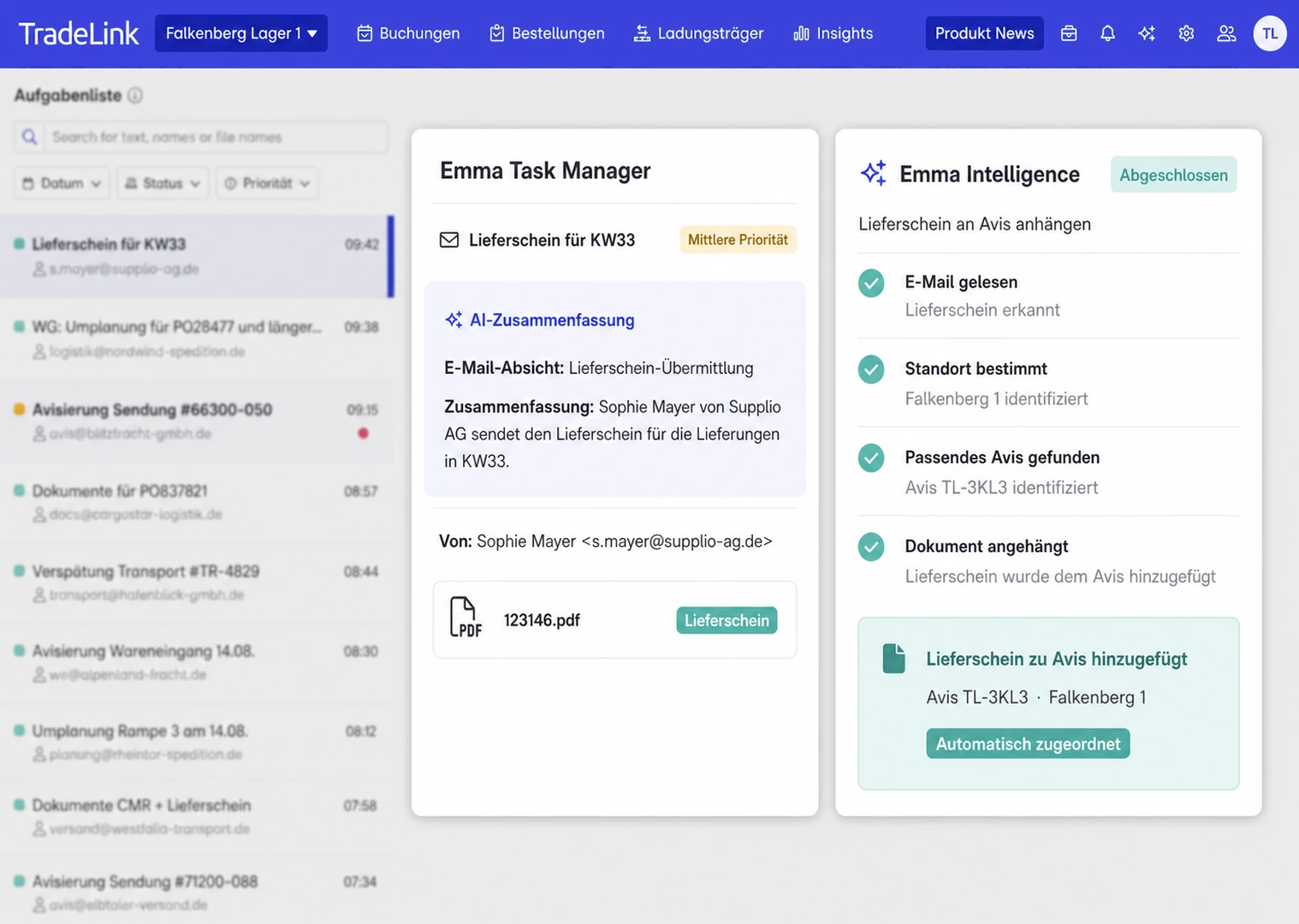
We connect suppliers, carriers and your sites in one workflow. AI agent Emma reads delivery emails and prepares time slot bookings. Your team decides what Emma is allowed to book automatically.
6. Inter-site stock transfers: The boundary between ERP and operations
When Plant A supplies Plant B, a single truck is an outbound process at the first location and an inbound process at the second. Goods can be physically in transit, even when one site has already posted goods issue and the receiving team has yet to record goods receipt.
For example, the receiving plant identifies a material requirement and requests a transfer. The issuing plant prepares and dispatches it. Depending on the company's booking method, goods in transit may be shown separately. The receiving plant plans its dock appointment, inspects the arrival and completes the appropriate ERP receipt.
SAP offers several inter-plant transfer methods, including one-step and two-step postings and stock transport orders. A two-step process can support visibility of quantities in transit. The method must reflect company structure, valuation rules and system configuration.
Operational coordination adds a different kind of information: Which truck is carrying the materials? When will it arrive? Has the destination reserved a dock? Are the documents available? Is the driver waiting? Inventory accounting alone does not answer those questions.
Use clear identifiers to connect the order, transport, sending and receiving locations. Load Carrier Management can also be relevant for shared pallets, cages and other returnable transport equipment.
7. Define KPIs that can be compared across locations
Network dashboards require consistent measurement rules. A facility handling refrigerated freight and extensive inspections may have different unloading times from a standard-pallet warehouse. Compare performance with the necessary context about volume, load mix and operating conditions.
Operational metrics for a multi-site scorecard
- Advance notice completeness: Percentage of expected deliveries that contain the required information before the agreed cutoff.
- Slot adherence: Percentage arriving within the booked time window.
- Waiting time: Time between actual arrival at the defined observation point and handling start.
- Turnaround time: Time from arrival to completed exit.
- Dock utilisation: Occupied dock time relative to scheduled availability.
- No-show rate: Bookings without a matching arrival in the reporting period.
- Discrepancy rate: Deliveries with quantity, quality or document problems.
- Partner adoption: Relevant suppliers and carriers using the agreed booking workflow.
For each measure define the start and end events, source of data, owner and reporting period. Look beyond averages by analysing days, hours, suppliers and shifts. A central manager can identify recurring issues across sites, while the local team investigates the underlying shipments and decides on improvements.
TradeLink's Insights Cockpit draws on bookings, check-ins and load checks for operational analysis. Further definitions appear in our guide to the most important logistics KPIs.
8. Which systems are needed for a multi-site network?
A multi-site approach does not require every location to replace its ERP or WMS at once. Different systems can coexist if the key data exchanges work and each system has an agreed responsibility.
- ERP: Purchasing, item master data, commercial transactions, inventory and inter-plant stock movements.
- WMS: Storage locations, put-away, picking and warehouse-level inventory tasks.
- Delivery coordination: Advance notices, time slots, arrivals, dock status, communications and recorded exceptions.
- Reporting: Shared definitions and events for site teams and central management.
Test the site identifier, order and shipment references, user access and error handling. Simulate missing identifiers, duplicate transactions, incorrect destination sites and failed interfaces. A successful demonstration with clean data is not sufficient.
AI agent Emma can help process routine email-based delivery notices. The team determines whether bookings can be created directly or need approval. For multi-site work, site assignment and exception rules must be clear. Emma does not replace ERP inventory postings.
9. Introduce the standard with a pilot before a wider rollout
Changing every site at once increases uncertainty. A representative pilot creates practical learning that can be reused. Choose a facility with real freight activity and typical exceptions rather than selecting only the easiest site.
Seven rollout steps
- Map current operations: Document existing appointment rules, systems, key partners, shift patterns and recurring bottlenecks.
- Agree shared requirements: Define mandatory references, events, KPIs, exception rules and ownership.
- Select the pilot: Involve high-volume suppliers and carriers who can test the new process.
- Run real scenarios: Test normal, early, late and unannounced deliveries including warehouse receipt and departure.
- Review results: Use consistent before-and-after measures and account for operating volumes.
- Prepare a rollout package: Document configuration, training, local responsibilities and tested interfaces.
- Add locations: Keep valid local differences visible and regularly review the shared standard.
A facility that has not yet opened also needs construction, access and go-live readiness checks. Our new logistics site opening checklist covers that situation. For established networks, process alignment and partner onboarding are often the central challenges.
10. Multi-site logistics management checklist
Assign owners and evidence for these checks when reviewing a logistics network.
Governance and operating model
- Central process ownership and local decision rights are documented.
- Facilities, docks and operating hours are recorded.
- Shipment, slot, check-in and completion events have shared definitions.
- Exception procedures and escalation contacts are clear.
- The onboarding process for new sites is repeatable.
Data and technology
- Site, supplier and shipment identifiers are unambiguous.
- Orders and physical deliveries can be linked.
- ERP, WMS and operational delivery tasks are clearly separated.
- Inter-site goods movements are recorded correctly.
- Duplicate data, failures and interface errors have fallback procedures.
Partner and site processes
- Frequent suppliers and carriers are supported across locations.
- Local safety and arrival instructions are easy to access.
- Time slots match the site's resources and dock capacity.
- Check-in, unloading and exit are recorded reliably.
- Documents, discrepancies and load carriers are traceable.
Reporting and continuous improvement
- KPI definitions are the same at every facility.
- Central and local teams have appropriate data access.
- Performance comparisons consider volume and handling differences.
- A pilot has been tested with real deliveries.
- Rollout owners, training and go-live approval are documented.
How we support logistics teams across sites
At Scheppach, we helped digitalise time slot bookings, load carrier processes and delivery data across multiple sites. This reduces coordination through spreadsheets and gives teams a clearer overview. At Bayer, we support driver check-in and digital documentation.
Our approach: Head office sees what is happening, while local teams decide what needs to happen at their docks. Read more in our customer stories.
How TradeLink helps coordinate logistics across sites
TradeLink connects industrial and retail companies with suppliers and carriers through a shared network. It supports delivery notices, appointment planning, driver arrivals, dock coordination and recorded exceptions. This provides a consistent basis for managing multiple sites while keeping local operations configurable.
The Collaboration Platform, Time Slot Management and Insights Cockpit are relevant building blocks. Yard processes, driver check-in, delivery documentation and AI agent Emma can be added when appropriate. The best rollout depends on existing systems, site needs and partners.
MANAGE MULTIPLE LOCATIONS
Central visibility. Local operational control.
Whether you manage two plants or a growing network, we show you how to coordinate deliveries across sites and pass routine email notices to AI agent Emma. Your team stays in charge of exceptions and priorities.
Frequently asked questions about multi-site logistics
What does multi-site logistics mean?
It means coordinating goods flows and logistics processes across multiple warehouses, plants and distribution centres. Common references, operating standards and reliable event data enable visibility across the network.
Which processes should be identical at every location?
Shared identifiers, mandatory data, process milestones, basic escalation rules and KPI definitions should be consistent. Opening hours, local safety rules and unloading times can be configured according to facility needs.
Does every warehouse require the same WMS?
Not necessarily. Different WMS solutions can coexist if essential information is exchanged reliably and responsibilities are clear. Operational delivery coordination does not replace correct inventory management.
How can headquarters coordinate sites without slowing local teams?
Head office sets the common framework and reporting requirements. Site managers assign docks, allocate people and manage exceptions within those boundaries. Shared status data keeps the results understandable.
How do suppliers work across multiple locations?
Use a common partner directory, consistent booking steps and clear location-specific instructions. Each delivery still requires accurate destination, order, shipment and contact information.
Which KPIs are most useful for comparing locations?
Advance notice completeness, appointment adherence, waiting and turnaround times, dock utilisation, no-shows and discrepancy rates are useful when definitions and reporting periods match.
How should a multi-site rollout begin?
Map existing processes, pilot at a representative facility, test real shipments and exceptions, then document the proven workflow before adding other sites. Review justified local differences as the network expands.